
Why Claup?
Claude Code stores every session as a JSONL transcript on disk. Useful, but not exactly browsable. Claup gives those transcripts the home they deserve: a fast, native macOS viewer with rich Markdown rendering, deep linking, tagging, and search — built so you can actually find that one clever fix from three weeks ago.
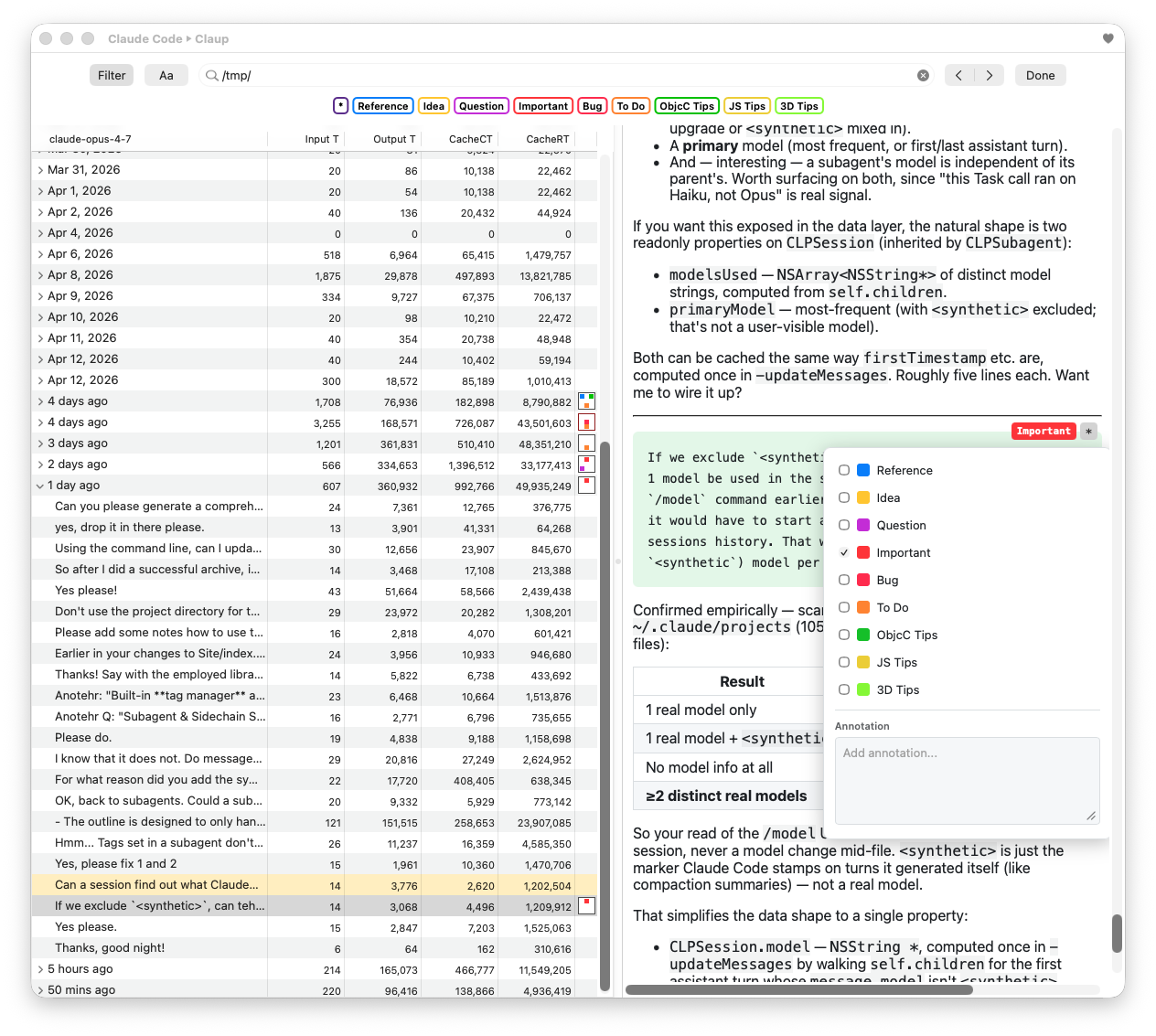
Features
Hierarchical Browsing
- Outline view with a clean Root ▸ Project ▸ Session ▸ Exchange hierarchy.
- Browse both the Claude Code directory (
~/.claude/projects) and the Xcode Claude Agent directory side-by-side, or focus on either one. - Lazy loading keeps the UI responsive even with hundreds of projects or sessions with very long histories.
- Sort projects by name or recency; sessions and exchanges sort by date.
- Friendly project and session names — long paths are abbreviated, and you can choose how sessions display (filename, start date, last changed, first prompt, last prompt, with optional relative times like 2 hours ago).
Beautiful Session Rendering
- Full Markdown support: tables, task lists, strikethrough, autolinks.
- Syntax highlighting for 190+ languages in fenced code blocks.
- Diff rendering for file edits, with green/red line highlighting.
- User-input messages are subtly tinted to make them easy to spot while scrolling.
- Tool results (file edits, command output, large outputs) are foldable — click a triangle to collapse, Option-click to fold or unfold all at once.
- Configurable visible-line thresholds for long patches and outputs.
- Dark mode follows the system appearance automatically.
Tags & Annotations
- Attach tags to any exchange, session, or project — with user-editable names and colors.
- Add freeform annotations on any exchange and find them later.
- A compact summary view shows at-a-glance which tags are present at every level of the hierarchy; outline rows recolor to flag annotations.
Search & Filter
- Filter sessions and exchanges by text, tags, or both — combine them to pinpoint the exchange you want.
Multi-Window & Deep Linking
- Open any root, project, session, or exchange in its own window.
clp://URL scheme for deep-linking directly to a session or exchange — great for cross-referencing in notes, issues, or commit messages.- Recents and Favorites lists, with a one-click favorite toggle.
- Full state restoration — Claup reopens exactly where you left off.
Live Updates
- The viewer updates in real time as Claude Code writes new exchanges to disk. Watch a session unfold while it's still being written.
Token Usage
- See token consumption numbers for sessions and exchanges, so you know what the expensive ones are.
Print & Export
- Uses your web browser for pagination and PDF export.
- Reveal in Finder from context menus to get to your project or session logs in Finder.
Configurable Everything
- Settings for default visible patch lines, tag colors and names, auto-scroll to bottom behavior, column visibility, and more.
- Debug mode when you need to see all the nitty gritty details of the stored session data.
Get Started
- Download Claup and unpack it if needed.
- Move Claude to your Applications folder
- Launch it!
- Claup automatically discovers your Claude Code and Xcode Claude Agent transcript directories.
- Press ⌘N for a new viewer — and start browsing.